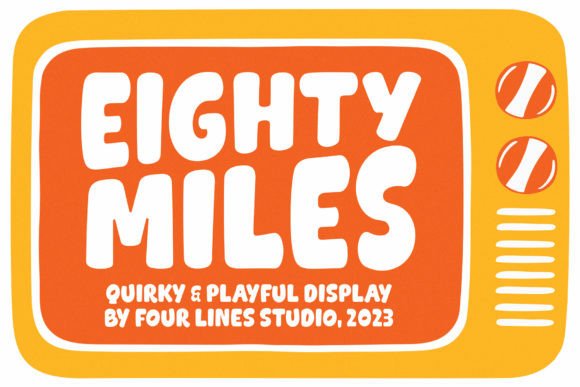
Eighty Miles: Integrating Bold Typography into Your Creative Workflow
In the landscape of digital design and brand communication, typography is rarely just an aesthetic afterthought. It is a functional tool that dictates how information is consumed, processed, and remembered. For professionals ranging from marketing directors to independent content creators, selecting the right typeface is a strategic decision that impacts user engagement and brand perception. This is where Eighty Miles enters the conversation. It is not merely a font; it is a deliberate design choice that balances whimsical character with rigorous readability, offering a solution for those who need their message to stand out without sacrificing clarity.
Understanding how to effectively integrate Eighty Miles into your existing workflows requires more than just downloading a file. It involves assessing where bold, attention-grabbing characters fit within your broader communication strategy. Whether you are designing a landing page, crafting social media assets, or laying out a printed brochure, the implementation of this typeface can significantly alter the tone and effectiveness of your output. This article explores the practical applications of Eighty Miles, focusing on its role in planning, execution, and long-term brand consistency.
The Strategic Role of Display Typography
Before implementing any new asset, it is crucial to understand its function. Eighty Miles is characterized by thick, attention-grabbing characters that embrace wild shapes. In typographic terms, this classifies it as a display font. Display fonts are designed for large sizes and short bursts of text, such as headlines, logos, and call-to-action buttons. They are not intended for body copy. Recognizing this distinction is the first step in effective workflow integration.
When you introduce Eighty Miles into a project, you are making a decision to prioritize visual impact. This fits naturally into the early stages of the creative process, specifically during the concepting and wireframing phases. By selecting a strong display font early, you set the tonal direction for the entire piece. It signals to stakeholders and team members that the final output will be energetic, modern, and confident. This preemptive decision saves time later in the production cycle, as it reduces the need for extensive revisions regarding the "feel" of the design.
Pre-Production: Planning and Compatibility Checks
Successful implementation begins with preparation. Before committing to Eighty Miles for a major campaign or product launch, evaluate its compatibility with your existing brand assets. Does your current color palette support the heavy weight of these characters? Will the whimsical nature of the font clash with the serious tone of your industry, or will it provide a necessary humanizing contrast?
Consider the technical environment where the font will be used. If you are working on web-based projects, ensure that the font files are optimized for fast loading times. Heavy, complex fonts can sometimes impact performance if not properly subsetted or formatted. For print projects, verify that the thickness of the characters holds up well at various scales. A practical tip during this phase is to create a style guide snippet that defines exactly how Eighty Miles should be used. Specify minimum font sizes, acceptable line heights, and pairing rules. This documentation serves as a reference point for everyone involved in the project, ensuring consistency from the initial draft to the final delivery.
Execution: Pairing and Visual Hierarchy
Once you move into the execution phase, the primary challenge is balancing the dominance of Eighty Miles with other elements on the page. Because the font is inherently loud, it demands space. Crowding it with other busy graphics or competing typography will dilute its impact and confuse the viewer. The key to successful integration is restraint.
Pairing with Neutral Typefaces
To maintain readability and professional polish, pair Eighty Miles with a clean, neutral sans-serif or a classic serif for body text. The contrast between the wild shapes of the headline font and the structured simplicity of the body font creates a clear visual hierarchy. This guides the reader’s eye naturally from the attention-grabbing header to the detailed information below. For example, if you are designing a newsletter, use Eighty Miles for the subject line preview or main section headers, but switch to a highly legible standard font for the article content. This ensures that the audience enjoys the whimsy of the header without struggling to read the core message.
Color and Background Considerations
The thickness of Eighty Miles makes it versatile for various background treatments, but caution is advised. On dark backgrounds, ensure there is sufficient contrast to prevent the characters from blending in. Conversely, on busy photographic backgrounds, consider using a solid color block behind the text or applying a subtle drop shadow to separate the font from the image. These small adjustments during the design process can significantly enhance legibility and overall aesthetic quality.
Workflow Integration Across Different Roles
The utility of Eighty Miles extends beyond graphic design, touching various professional workflows. Here is how different users can integrate this tool into their daily operations:
- Marketers and Advertisers: Use Eighty Miles for ad creatives where stopping power is essential. In social media feeds, users scroll quickly. A bold, unique font can arrest that motion, increasing click-through rates. Integrate it into your template library so that every campaign maintains a consistent visual identity without requiring redesign from scratch each time.
- Entrepreneurs and Small Business Owners: For those managing their own branding, Eighty Miles can serve as the cornerstone of a logo or packaging design. Its memorable shapes help in building brand recognition. When creating pitch decks or presentations, use it sparingly for slide titles to keep the audience engaged without overwhelming them with text.
- Educators and Content Creators: In educational materials, engagement is key. Using Eighty Miles for chapter headings or key concepts can break up monotony and highlight important information. However, always prioritize accessibility. Ensure that the font size is large enough to be read easily by all users, including those with visual impairments.
- Web Developers: When implementing Eighty Miles on websites, focus on fallback fonts. Define a robust font stack in your CSS to ensure that if the custom font fails to load, the layout remains stable and readable. Test the rendering across different browsers and devices to guarantee a consistent user experience.
Quality Control and Long-Term Consistency
Adopting a new typeface is not a one-time event; it is an ongoing commitment to brand consistency. As your projects scale, maintaining the integrity of how Eighty Miles is used becomes critical. Establish a review process where designs are checked against your style guide. Look for common mistakes, such as stretching the font disproportionately, using it at too small a size, or pairing it with incompatible typefaces.
Furthermore, consider the longevity of your choice. While trends in typography shift, the fundamental principles of readability and impact remain constant. Eighty Miles is crafted to ensure that the audience can enjoy the whimsy without missing a beat, suggesting a design that is both contemporary and timeless. By anchoring your visual identity in a font that balances fun with function, you future-proof your brand against fleeting design fads.
Practical Tips for Immediate Implementation
To start using Eighty Miles effectively today, consider these actionable steps:
- Audit Your Current Assets: Review your existing designs. Identify areas where the current typography feels weak or generic. Replace static headers with Eighty Miles to inject energy and focus.
- Create a Template Library: Build reusable templates for common tasks—social posts, email headers, presentation slides—with Eighty Miles pre-installed and styled. This reduces friction in your workflow and ensures consistent application.
- Test Readability: Print out samples or view them on multiple devices. Ask colleagues for feedback. Is the message clear? Is the font distracting or enhancing? Use this feedback to refine your usage guidelines.
- Document Your Decisions: Keep a record of why and how you use Eighty Miles. This institutional knowledge is valuable for onboarding new team members or handing off projects to freelancers.
In conclusion, Eighty Miles is more than a collection of characters; it is a strategic asset for anyone looking to enhance their visual communication. By understanding its strengths, planning its integration, and maintaining strict quality control, you can leverage its bold personality to make your message take center stage. Whether you are a seasoned designer or a business owner handling your own marketing, the thoughtful application of this font can elevate your work, ensuring that your audience not only sees your content but engages with it meaningfully.