Integrating Glory Retro into Your Creative Workflow
In the landscape of modern graphic design, typography serves as more than just a vessel for information; it is the primary driver of tone, emotion, and brand identity. For designers, marketers, and content creators, selecting the right typeface is a critical decision that influences the entire trajectory of a project. Glory Retro has emerged as a significant asset in this domain, offering a thick, versatile display font that bridges the gap between nostalgic charm and contemporary usability. Understanding how to effectively integrate this typeface into your broader creative process can elevate the quality of your output and streamline your production workflow.
Understanding the Role of Display Typography
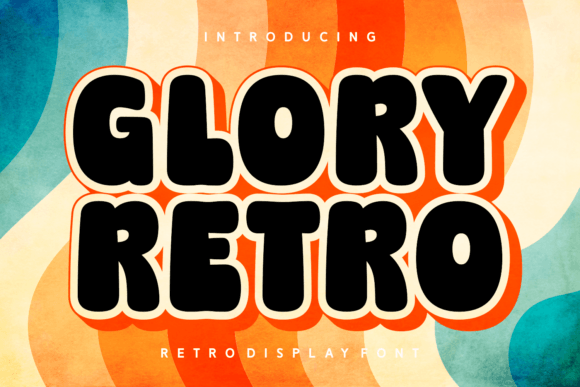
Before diving into specific applications, it is essential to understand where a font like Glory Retro fits within a design hierarchy. Display fonts are designed for large sizes and short bursts of text, such as headlines, logos, and posters. They are not intended for body copy. Glory Retro, with its chubby, retro-style characters, functions as a high-impact visual element. Its thickness ensures readability from a distance, while its playful curves inject personality into otherwise sterile layouts.
When planning a creative project, the choice of typography often dictates the color palette, imagery style, and overall composition. By selecting Glory Retro early in the conceptual phase, you establish a clear visual direction. This proactive approach prevents the common pitfall of trying to force a generic sans-serif font to carry a heavy emotional load, which often results in disjointed or uninspired designs. Instead, let the distinctive characteristics of Glory Retro guide your subsequent design decisions, ensuring a cohesive and intentional final product.
Strategic Implementation Across Industries
The versatility of Glory Retro allows it to permeate various professional sectors. Its application is not limited to graphic design alone but extends to marketing, education, and small business branding. Here is how different professionals can leverage this tool within their specific workflows.
Branding and Identity for Small Businesses
For entrepreneurs and small business owners, establishing a memorable brand identity is paramount. Glory Retro offers a friendly, approachable aesthetic that works exceptionally well for businesses aiming to appear accessible and fun. Consider using this font for logo design, particularly for cafes, bakeries, vintage shops, or creative studios. The thick strokes of the font hold up well when scaled down for social media avatars or printed on small merchandise items like stickers and tags.
When developing a brand guide, pair Glory Retro with a clean, neutral sans-serif for body text. This contrast ensures that the retro flair of the headline does not overwhelm the reader. This combination creates a balanced visual hierarchy, allowing the brand’s personality to shine through the headers while maintaining clarity in the detailed information. This strategic pairing is a key component of effective brand consistency.
Marketing Campaigns and Social Media Content
Marketers and social media managers operate in a fast-paced environment where capturing attention quickly is crucial. Glory Retro’s bold presence makes it an ideal candidate for Instagram stories, Pinterest pins, and Facebook ad creatives. The font’s retro vibe taps into current design trends that favor nostalgia, helping posts stand out in crowded feeds.
To maximize efficiency, create templates in tools like Canva or Adobe Photoshop that pre-load Glory Retro for headlines. This preparation reduces the time spent on font selection for each new post, allowing you to focus on copywriting and imagery. Consistency in typography across your social media channels reinforces brand recognition, making your content instantly identifiable to your audience.
Educational Materials and E-Learning
Educators and instructional designers can utilize Glory Retro to make learning materials more engaging. Traditional educational resources often suffer from a dry, academic aesthetic that can disengage students. By incorporating a fun, retro-style font for section headers, quiz titles, or certificate designs, you can create a more inviting and less intimidating learning environment. This is particularly effective for younger audiences or for courses related to creative subjects, history, or pop culture.
However, usability remains a priority. Ensure that Glory Retro is used only for titles and short labels. For lengthy instructional text, stick to highly readable serif or sans-serif fonts. This distinction helps learners navigate the material easily, distinguishing between structural elements and core content without cognitive overload.
Technical Considerations and Compatibility
Integrating a new font into your workflow requires attention to technical details to ensure smooth execution. Glory Retro is a digital asset that must be managed correctly to avoid licensing issues and compatibility errors.
- File Formats: Ensure you have the correct file formats for your intended use. OTF (OpenType Font) and TTF (TrueType Font) are standard for desktop design software like Adobe Illustrator, Photoshop, and InDesign. If you are using the font for web projects, verify if you have the necessary WOFF or WOFF2 files, or use a web font service that supports Glory Retro.
- Software Compatibility: Most modern design platforms support standard font files. However, if you are working in browser-based tools, check their specific upload requirements. Some platforms may require you to upload the font file directly, while others might need you to use a plugin or extension.
- Licensing: Always review the license agreement associated with Glory Retro. Personal use licenses differ significantly from commercial ones. If you are creating assets for a client or for sale, ensure you have the appropriate commercial license to avoid legal complications later in the project lifecycle.
Optimizing Design Quality with Glory Retro
Using a distinctive font like Glory Retro requires a nuanced approach to layout and spacing. Because the characters are thick and chubby, they occupy more visual space than standard fonts. This characteristic demands careful attention to kerning and leading.
Kerning, or the space between individual characters, may need adjustment to prevent letters from touching or appearing too cramped. Given the rounded nature of Glory Retro, tight kerning can sometimes look intentional and stylish, but it can also reduce legibility if taken too far. Test different kerning settings at various sizes to find the optimal balance for your specific context.
Leading, or the vertical space between lines of text, is another critical factor. Since Glory Retro is a display font, it is rarely used in multi-line paragraphs. However, if you use it for subheadings or short quotes, ensure there is enough breathing room above and below the text. This whitespace enhances the impact of the font and prevents the design from feeling cluttered.
Color selection also plays a vital role in how Glory Retro is perceived. The font’s retro aesthetic pairs well with muted, vintage color palettes, such as mustard yellows, teal blues, and burnt oranges. Alternatively, high-contrast combinations, like black text on a white background or vice versa, can emphasize the boldness of the strokes. Experiment with color overlays and shadows to add depth, but avoid excessive effects that might obscure the font’s clean lines.
Long-Term Asset Management
For freelancers and agencies, maintaining an organized library of fonts is essential for long-term efficiency. Once you have purchased and downloaded Glory Retro, integrate it into your font management system. Tools like Adobe Fonts, Font Book on macOS, or third-party managers like RightFont can help you activate and deactivate fonts as needed, keeping your system running smoothly.
Document your usage of Glory Retro in your project files. Note which color codes and spacing settings worked best for specific clients or campaigns. This documentation creates a reference point for future projects, reducing the time spent on trial and error. Over time, you will develop a intuitive sense of when and how to deploy this font for maximum impact.
In conclusion, Glory Retro is more than just a typeface; it is a strategic tool that can enhance the visual communication of your projects. By understanding its strengths, respecting its limitations, and integrating it thoughtfully into your workflow, you can create designs that are not only aesthetically pleasing but also effective in achieving your professional goals. Whether you are branding a new business, crafting social media content, or designing educational materials, this versatile font offers the retro charm and modern functionality needed to stand out in today’s competitive creative landscape.